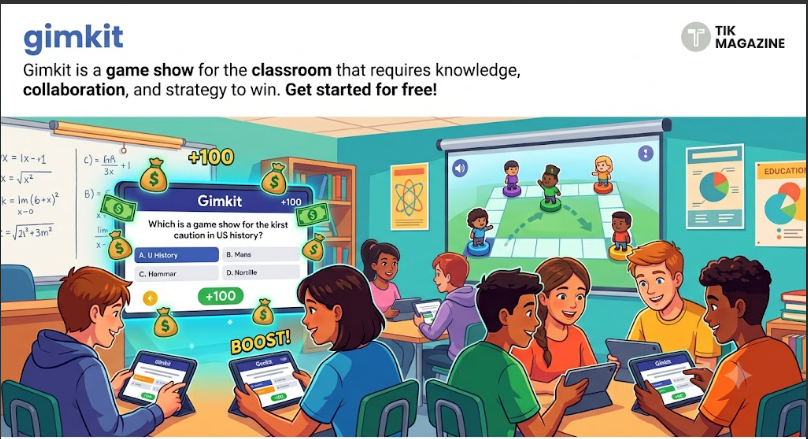
Gimkit is one of those classroom tools that quietly changed how teachers run quizzes without most students even noticing the shift. On the surface, it looks like a simple quiz game. Students answer questions, earn points, and compete. But under the hood, it behaves more like a strategy game where correct answers turn into in-game currency that can be upgraded, reinvested, or used to gain advantage over time.
That difference is what made Gimkit spread quickly in schools. It doesn’t just test knowledge. It rewards how consistently you perform and how well you manage resources during gameplay. For teachers, it’s a structured way to keep students engaged without turning the classroom into chaos. For students, it feels less like a test and more like a game they actually want to stay in.
What Gimkit actually is and why it stands out
At its core, Gimkit is a web-based learning platform built around interactive quizzes called “kits.” Teachers create these kits using their own questions or imported material, and students join live sessions or assignments using a game code. What sets it apart is the in-game economy. Instead of just earning points for correct answers, students earn virtual money. That money can be spent on upgrades that increase earning speed, unlock advantages, or change gameplay strategy depending on the mode being used.
So instead of a linear quiz where the goal is simply to get a high score, Gimkit introduces a loop: answer questions → earn currency → upgrade → perform better → repeat. That loop is what keeps attention longer than traditional quiz apps. Not everyone agrees on how effective gamification always is in education, but Gimkit has stayed popular because it doesn’t feel like it’s forcing engagement. It builds it into the structure of the game itself.
How students join a Gimkit game
Joining a Gimkit session is intentionally simple because it’s built for classroom timing. Students don’t need to go through long registration steps during live play A teacher starts a game and receives a short join code. Students then go to the official join page and enter that code. Once they join, they wait in a lobby until the teacher starts the game. The simplicity matters here. In a real classroom, anything that takes more than a minute or two tends to break flow. Gimkit’s join system is designed to avoid that problem entirely. It also supports quick re-entry, which helps if someone disconnects mid-session.
Logging in and what the dashboard actually does
The login system is mainly used by teachers and students who want saved progress or access to full features. Once logged in, users enter a dashboard that acts as the control center. The dashboard is where kits are created, classes are managed, and game reports are stored. Teachers can see which kits have been used, which assignments are active, and how students performed over time.
This is also where Gimkit becomes more than a game tool. It becomes a lightweight assessment system. Instead of manually checking worksheets, teachers can review performance data generated automatically during gameplay. The important thing to understand is that the dashboard isn’t decorative. It’s the operational core of the platform.
Hosting a Gimkit game in a classroom
Hosting is where the teacher takes control of the session. A host selects a kit, chooses a game mode, adjusts settings, and launches the live game. Once the game starts, students enter using the shared code and begin answering questions. The teacher can monitor progress in real time and control when the game ends.
The structure is flexible enough to be used in different teaching styles. Some teachers use it as a warm-up activity. Others use it for full revision sessions before exams. The system doesn’t force a single teaching approach, which is part of why it works across different grade levels. Here’s where it gets interesting: the host isn’t just a facilitator. They indirectly control pacing through settings like time limits, question pools, and game mode selection. That makes hosting more strategic than it first appears.
Creating kits and building your own content
Creating a kit is the first step in building any Gimkit experience. A kit is simply a collection of questions and answers that form the basis of gameplay. Teachers can write questions manually or import them from other sources. The platform is flexible enough to support different question styles, which makes it easy to adapt existing lesson material.
Once a kit is created, it can be reused, edited, or assigned as homework. That reuse factor is important. It means teachers don’t need to rebuild content every time they want to run a game. Over time, this builds a library of learning materials that can be reused across semesters.
What Gimkit Live actually feels like for students
Gimkit Live is where the platform becomes more than a quiz tool. Students are placed into a live environment where every correct answer earns money, and every decision about upgrades affects future performance. The experience is intentionally designed to feel dynamic. Instead of waiting for everyone to finish a question, students move at their own pace within the game structure. That reduces pressure compared to traditional timed tests.
But there’s a tradeoff. Students who focus too much on upgrades and strategy sometimes slow down their answering speed. Others focus only on speed and ignore strategy. That balance between accuracy and decision-making is part of the design. Different game modes can change the experience significantly, but the core loop remains the same: answer, earn, upgrade, repeat.
Why teachers use Gimkit instead of regular quizzes
Teachers tend to use Gimkit for three main reasons: engagement, repetition, and feedback. First, engagement is higher because students feel like they are playing a game rather than taking a test. Second, repetition becomes easier because students are willing to repeat kits without resistance. Third, feedback is immediate, which helps both teachers and students understand where learning gaps exist.
That said, Gimkit isn’t meant to replace full instruction. It works best as a reinforcement tool rather than a primary teaching method. Some educators also point out that gamification can shift focus away from deep learning if overused. That’s why it’s usually combined with traditional lessons rather than replacing them.
Common misunderstandings about Gimkit
One common misunderstanding is that Gimkit is just a quiz app with points. In reality, it’s closer to a learning game economy. Another misconception is that it requires constant internet-heavy setup or advanced tech knowledge. In practice, it runs in a browser and is designed to be lightweight for classroom use. There’s also confusion around fairness in gameplay. Since students can upgrade abilities, some assume it creates imbalance. But most game modes are designed so that knowledge still matters more than upgrades over time.
Limitations worth knowing
Gimkit is effective, but it isn’t perfect. It depends heavily on student participation and internet access. If students are disengaged, the game element loses its impact quickly. It also requires teachers to spend time building quality kits. Poorly designed question sets reduce learning value. And while the game mechanics are engaging, they don’t automatically guarantee deeper understanding. Like any tool, the educational outcome depends on how it’s used.
Conclusion
Gimkit sits in a space between learning tool and game. It doesn’t try to replace teaching, but it changes how practice and revision feel inside the classroom. By turning questions into an interactive system of rewards and strategy, it keeps students engaged in a way that traditional worksheets rarely manage. Its real strength is not complexity but structure. Everything—from joining a game to tracking performance—has been designed to reduce friction and keep focus on learning through repetition.
As classrooms continue blending digital tools into everyday teaching, platforms like Gimkit show how simple ideas, when designed carefully, can reshape how students interact with knowledge without overwhelming teachers or learners.